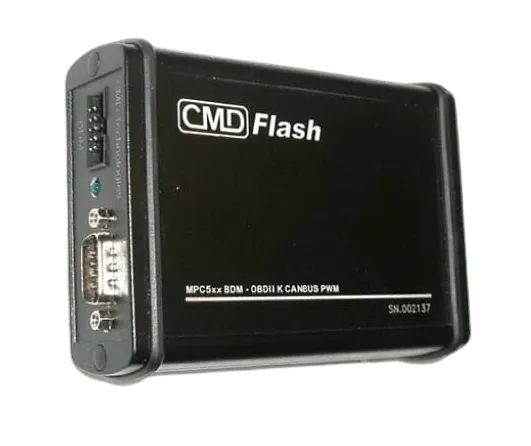
Are you thinking of buying a Flashtec CMD or do you already have one and want to get the most out of it? In this comprehensive review, we tell you everything you need to know about one of the most popular chiptuning tools on the market.
At EcuTracer, we work daily with Flashtec CMD files from hundreds of workshops and tuners. Therefore, we have in-depth knowledge of its capabilities, limitations, and tricks to get the most out of it.
📩 Do you already have CMD Flashtec and need files? At EcuTracer, we process CMD Flashtec Master and Slave files every day. Send us your reading, and we'll return the file ready to write in less than an hour. 👉 Request file via WhatsApp · View file service
⭐ What is CMD Flashtec?
CMD Flashtec is a professional ECU reading and writing tool developed by the Italian company Flashtec. It has become one of the preferred options for chiptuning workshops worldwide.
✅ Main features
- 🔹 OBD read and write: Direct connection to the diagnostic port
- 🔹 Bench Mode: Bench reading for protected ECUs
- 🔹 Boot Mode: For control units with advanced protection
- 🔹 Frequent updates: Ongoing support for new vehicles
- 🔹 No subscription: You pay for the tool and updates are optional
✅ Who is CMD Flashtec for?
CMD Flashtec is aimed at:
- 🔹 Chiptuning workshops seeking independence
- 🔹 Tuners who want to read and write their own files
- 🔹 Professionals who need a reliable and versatile tool
- 🔹 Tuners who work with multiple brands
🔥 Available CMD Flashtec Versions
Flashtec offers different configurations to suit your needs:
🏎️ CMD Flashtec Master
The full version for professionals:
| Feature | Detail |
|---|---|
| License type | Master (open files) |
| OBD Reading | ✅ Yes |
| Bench Reading | ✅ Yes |
| Boot Reading | ✅ Yes |
| Archives | Unencrypted (editable) |
| Indicative price | €2,500 – €3,500 |
Advantages: Fully open files that you can edit in WinOLS or any other program software Calibration. Total independence.
🔧 CMD Flashtec Slave
Affordable version linked to a Master's degree:
| Feature | Detail |
|---|---|
| License type | Slave (linked to Master) |
| OBD Reading | ✅ Yes |
| Bench Reading | ✅ Yes |
| Boot Reading | ✅ Yes |
| Archives | Encrypted (you need a provider) |
| Indicative price | €1,500 – €2,000 |
Advantages: More economical price. Ideal if you work with a file provider like EcuTracer.
💡 If you work with CMD Slave, check out our Stage 1, Stage 2 and Stage 3 guide to understand what tuning options you can offer your customers.
📊 Vehicles Compatible with CMD Flashtec
CMD Flashtec has one of the most extensive databases on the market:
Cars
| Brand | Compatibility | Supported ECUs |
|---|---|---|
| Audi | ⭐⭐⭐⭐⭐ | Bosch, Siemens, Continental |
| BMW | ⭐⭐⭐⭐⭐ | Bosch, Siemens |
| Mercedes | ⭐⭐⭐⭐⭐ | Bosch, Delphi |
| Volkswagen | ⭐⭐⭐⭐⭐ | Bosch, Siemens, Continental |
| SEAT/Skoda | ⭐⭐⭐⭐⭐ | Bosch, Siemens, Continental |
| Ford | ⭐⭐⭐⭐ | Bosch, Delphi, Continental |
| Opel | ⭐⭐⭐⭐ | Bosch, Delco, Denso |
| Peugeot/Citroën | ⭐⭐⭐⭐ | Bosch, Delphi, Marelli |
| Renault | ⭐⭐⭐⭐ | Bosch, Siemens, Continental |
| Hyundai/Kia | ⭐⭐⭐⭐ | Bosch, Kefico, Delphi |
| Toyota | ⭐⭐⭐ | Denso |
| Sling | ⭐⭐⭐ | Keihin, Bosch |
Trucks and commercial vehicles
| Brand | Compatibility |
|---|---|
| DAF | ⭐⭐⭐⭐⭐ |
| Iveco | ⭐⭐⭐⭐⭐ |
| MAN | ⭐⭐⭐⭐⭐ |
| Mercedes Trucks | ⭐⭐⭐⭐⭐ |
| Renault Trucks | ⭐⭐⭐⭐ |
| Scania | ⭐⭐⭐⭐ |
| Volvo Trucks | ⭐⭐⭐⭐ |
Tractors and agricultural machinery
| Brand | Compatibility |
|---|---|
| John Deere | ⭐⭐⭐⭐⭐ |
| New Holland | ⭐⭐⭐⭐⭐ |
| Case IH | ⭐⭐⭐⭐ |
| Fendt | ⭐⭐⭐⭐ |
| Claas | ⭐⭐⭐⭐ |
| Massey Ferguson | ⭐⭐⭐⭐ |
| Deutz-Fahr | ⭐⭐⭐⭐ |
⚡ Flashtec CMD Reading Modes
One of the great advantages of CMD Flashtec is its versatility in connection modes:
📡 OBD Mode (Diagnostic Port)
The simplest and fastest method:
- 🔹 Connection: Direct to the vehicle's OBD port
- 🔹 Time: 5-30 minutes depending on the ECU
- 🔹 Advantage: No disassembly required
- 🔹 Limitation: Some newer ECUs are protected
OBD compatible ECUs: Bosch EDC15, EDC16, EDC17, MED9, MED17, Siemens PPD, PCR, Continental SID, and many more.
🔧 Bench Mode (Tabletop)
For ECUs with OBD protection or when you need full access:
- 🔹 Connection: Cables connected directly to the removed ECU
- 🔹 Time: 15-60 minutes
- 🔹 Advantage: Access to protected ECUs
- 🔹 Limitation: Requires removing the ECU
ECUs that require Bench: Bosch MD1, MG1, some EDC17 with protection.
💻 Boot Mode
The most advanced method for ECUs with maximum protection:
- 🔹 Connection: Solder points on the PCB
- 🔹 Time: 30-90 minutes
- 🔹 Advantage: Full access to any ECU
- 🔹 Limitation: Requires experience and care
ECUs that require Boot mode: Continental SID807 EVO, Delphi DCM, some Denso.
🆚 CMD Flashtec vs Competition
How does CMD Flashtec compare to other tools?
CMD Flashtec vs KESS v2
| Aspect | CMD Flashtec | KESS v2 |
|---|---|---|
| Price | €€€ | €€€€ |
| OBD Coverage | ⭐⭐⭐⭐⭐ | ⭐⭐⭐⭐⭐ |
| Bench Mode | ✅ Integrated | ❌ You need KTag |
| Boot Mode | ✅ Integrated | ❌ You need KTag |
| Updates | Optional | Subscription |
| Truck support | ⭐⭐⭐⭐⭐ | ⭐⭐⭐⭐ |
Verdict: CMD Flashtec offers better value for money by combining all modes in a single tool.
CMD Flashtec vs Autotuner
| Aspect | CMD Flashtec | Autotuner |
|---|---|---|
| Price | €€€ | €€€ |
| OBD Coverage | ⭐⭐⭐⭐⭐ | ⭐⭐⭐⭐ |
| Bench Mode | ✅ Spacious | ✅ Spacious |
| Ease of use | ⭐⭐⭐⭐ | ⭐⭐⭐⭐⭐ |
| Updates | Less frequent | Very frequent |
Verdict: Autotuner is easier to use; CMD Flashtec has better truck coverage.
💡 Tips for Using CMD Flashtec
After working with thousands of Flashtec CMD files, here are our tips:
✅ Before reading
- Battery charged: Make sure the battery is at 100% or use a charger
- Cold engine: Best read with the engine cold to avoid problems
- Correct identification: Verify the ECU number before starting
- Always back up: Always keep the original file in a safe place
✅ During reading
- Do not interrupt: Never disconnect during reading/writing
- Avoid interference: Switch off other electronic devices
- Verify checksum: Check that the read file has a correct checksum
- Compare sizes: The file must be the expected size
✅ After writing
- Verify the write: Perform a verification reading
- Clear fault codes: Clear the DTCs before handing over the vehicle
- Road test: Always road-test the vehicle after flashing
- Document everything: Keep a record of the work done
🛠️ Common Problems and Solutions
❌ «Communication Error» when connecting
Possible causes:
- Faulty USB cable
- Drivers not installed correctly
- damaged vehicle OBD port
Solution: Try another USB cable, reinstall the drivers, check the OBD fuses.
❌ «Checksum Error» in the file
Possible causes:
- Interrupted reading
- Electrical interference
- ECU with problems
Solution: Repeat the reading with a fully charged battery and without interruptions.
❌ ECU not found
Possible causes:
- Incorrect protocol selected
- ECU not supported in OBD mode
- Software update required
Solution: Verify the correct protocol, test Bench mode if necessary, update CMD Flashtec.
❌ Failed writing
Possible causes:
- Corrupt or incorrect file
- Low battery during writing
- Uncorrected checksum
Solution: Always use verified files, keep the battery charged and make sure the checksum is correct.
📁 Flashtec CMD files in EcuTracer
At EcuTracer we are 100% compatible with CMD Flashtec, in both Master and Slave versions:
✅ What we offer
- 🔹 Files for CMD Flashtec Slave: Encrypted and ready to flash
- 🔹 Files for CMD Flashtec Master: Open for editing if you prefer
- 🔹 Technical support: We help you with any reading problem
- 🔹 Delivery in less than 1 hour: Monday to Friday, 9:00–22:00
✅ Work process
- Read the ECU with your CMD Flashtec
- Upload the file to EcuTracer
- Select the options (Stage 1, DTC OFF, etc.)
- Download the modified file
- Flash with your CMD Flashtec
It's that simple.
❓ Frequently Asked Questions about CMD Flashtec
🔹 Is CMD Flashtec worth it in 2026?
Yes, it remains one of the best tools on the market. Its value for money is excellent, especially if you work with trucks and agricultural machinery, where it stands out from the competition.
🔹 CMD Flashtec Master or Slave?
It depends on your business model. If you want to edit your own files, you need the Master version. If you work with a file provider like EcuTracer, the Slave version is sufficient and more economical.
🔹 Are updates mandatory?
No. You can use CMD Flashtec without updating, but you'll lose support for newer vehicles. Updates are paid, but there's no mandatory monthly subscription.
🔹 Is CMD Flashtec difficult to use?
It has a moderate learning curve. If you've used other chiptuning tools before, you'll adapt quickly. The software is intuitive but requires familiarity with the different reading modes.
🔹 Can I use CMD Flashtec with EcuTracer?
Yes, we are 100% compatible. Whether you have a Master or Slave version, we can process your files without any problems.
🔹 Where to buy genuine CMD Flashtec?
We recommend purchasing only from official Flashtec distributors. Beware of Chinese clones that can damage ECUs.
🔹 Does CMD Flashtec have a warranty?
Yes, official distributors offer a warranty. Additionally, Flashtec has good technical support for hardware issues.
🔹 What computer do I need for CMD Flashtec?
Windows 10 or 11, USB 2.0 or 3.0 port, 4GB of RAM minimum. Does not require high resource requirements.
🚀 Do you already have CMD Flashtec?
If you already have your Flashtec CMD and need professional reprogramming files, we at EcuTracer are ready:
- ✅ +15,000 vehicles supported
- ✅ Delivery in less than 1 hour
- ✅ Technical support Monday to Friday, 9:00–22:00
- ✅ 100% compatible with CMD Flashtec Master and Slave
- ✅ Files for Stage 1, Stage 2, DPF, EGR, AdBlue Solutions and more
🔥 Register for free at EcuTracer and start requesting files today.
👉 Request file via WhatsApp · Check my vehicle
💬 Do you have questions about compatibility or any difficult reading? Write to us and we'll help you.